Usage Logs records detailed information about every API call you make, including the call time, the model used, token usage, and cost.
Access URL: https://app.ppapi.ai/usage-logs
1. Page Overview
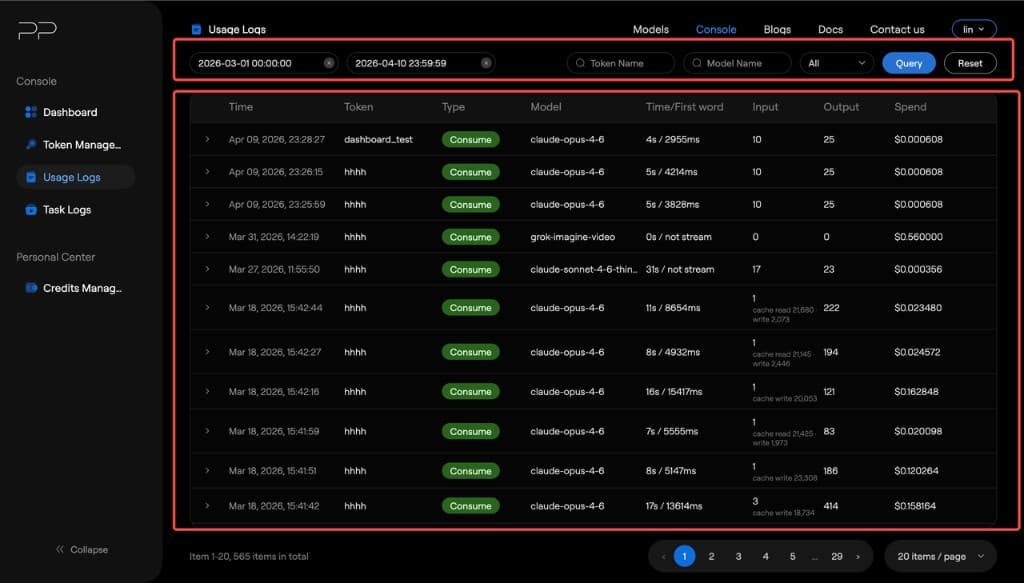
The page is divided into a filter area and a log list.
2. Filter Area
| Control | Description |
|---|---|
| Start Time | Select the date range you want to query. Default is today (00:00:00 to 23:59:59). Click × to clear. |
| Token Name | Search by token name (exact match). |
| Model Name | Search by model name (exact match). |
| Type | Dropdown. Filter by request type. Default is All. You can choose consume or error. |
| Query button | Execute the query. |
| Reset button | Reset all filter conditions. |
3. Log List
| Column | Description |
|---|---|
| Time | Request start time |
| Token | Token name used |
| Type | Log type (consume or error) |
| Model | The actual model called |
| Time/First word | Time to First Token (from request sent to first token received) |
| Input | Input token count |
| Output | Output token count |
| Spend | Cost (USD) for this request |
4. Log Details
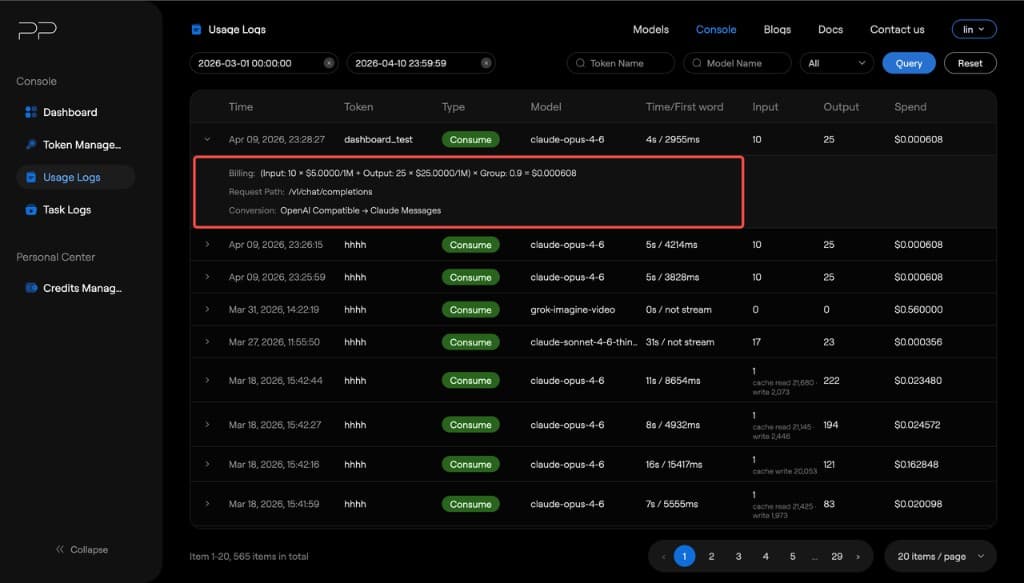
Click a log to expand the details, including the complete billing flow, request path, and request method.
5. Pagination
At the bottom of the page, you can see the total number of records. You can switch page size (10 / 20 / 50 / 100).
6. Common Scenarios
• Track spend for a specific key: enter the key name in the Token Name filter to view all calls made with that key. • Analyze usage for a particular model: enter a model name (e.g. gpt-5.4-mini) in Model Name to view all calls for that model. • Investigate abnormal requests: filter by time range and check whether the Spend column has unusually high costs. • Evaluate model performance: compare Time/First word to look at first-token latency across models.
FAQ
Q: How often does log data update? A: Real-time updates. Q: Can I export log data? A: Not supported yet. Please contact the operations team to export. Q: What does Time/First word mean? A: It is Time to First Token (TTFT), the time from sending a request to receiving the first response token. This is an important metric for measuring response speed. In streaming scenarios, this value directly affects how responsive the user perceives the model to be.